Custom admin portals for small businesses | Tampa Bay and nationwide

Custom Admin Portals: 27 private back offices for small businesses

Since May 2026 we have built 27 custom admin portals: private client portals for small business owners, where every website form lands in one inbox and one pipeline. Then we shape each one around how that business sells, from estimate calendars and booking sync to wholesale orders.

  • Admin Portal
  • Custom Web App
27
custom admin portals built
One per client, May 6 to October 16, 2026, counted from the portal code repositories
15
live on the client's own admin web address
Custom admin domains with SSL in our launch records, each confirmed loading on October 20, 2026
21 of 27
portals with views built for that business
Views beyond the standard inbox, pipeline and spam tabs, from a scan of all 27 portals in October 2026
27 of 27
portals with a Spam & Blocked tab
Checked across all 27 portal code repositories on October 20, 2026
What it is

What a WES Admin Portal Does

An admin portal is a private back office for your business on your own web address, such as admin.yourbusiness.com. It is a client portal for small business owners and their staff. Every form on your website, from contact and quote requests to calculators, quizzes and job applications, lands in one inbox, and each lead opens with every answer in plain labels, plus a status, notes, a follow-up date and a history of who did what. Because each one is a custom admin dashboard built for one business, a bakery sees cake orders and catering, a salon sees bookings and review requests, and a sign company sees project requests and vendor applications.

The challenge

The Problem Owners Had

Before a portal, many owners got one email per form and kept everything else in spreadsheets and outside tools. Nobody could see in one place who had been called back, what was booked, or what the spam filter had stopped.

  • Every website form sent its own email, so leads sat in inboxes with no status, notes or follow-up date.
  • Other leads lived in spreadsheets and outside tools. Glam.Is.On's were spread across three Google Sheets with no single pipeline view, while its appointments lived in Square.
  • Phone calls, walk-ins and referrals had no place to be logged next to the web leads.
  • Spam filters stop junk, but they can also stop a real customer, and nobody sees it happen.
  • Appointments lived apart from the leads. At Millennium Lawn, Landscape & Nursery, estimates were booked in Outlook and never reached the lead records, so nobody could say what was on the books that week.
The plan

What We Proposed

We proposed one private back office per business, fed by every form on the website and dressed in the client's own brand, then shaped around how that business actually sells.

  • One inbox and one drag-and-drop pipeline for web leads, phone calls and walk-ins
  • A Spam & Blocked tab, so a blocked customer never disappears without a trace
  • Views and stage names that fit the business, such as cake orders, seller quotes, membership stages and hiring stages
  • Automation where it helps: follow-up emails, review requests, booking sync, calendar invites and AI assistants
The build

What We Built

One inbox for every lead

Every form on the website lands in one unread-first inbox, and each lead opens as a clean record.

  • Dashboard with lead counts and the most recent submissions
  • Unread-first inbox, with the full submission history one click away
  • Every answer in plain labels, plus a status, notes, a follow-up date and an activity history
  • An Add lead button for phone calls, walk-ins and referrals
  • Dates and times shown in the business's own time zone

A pipeline shaped to the business

Leads move across a drag-and-drop board from New to Won, with views and stage names that fit how each business sells.

  • Stage names that fit each business, such as membership stages for THE SIXTY TWO Society and hiring stages on Glam.Is.On's Employment board
  • 21 of 27 portals add views built for that business
  • Seller quotes with up to six photos each for Ben's Toy Chest
  • Project requests, vendor applications and cut sheet downloads for National Sign Team
  • A loan officer recruiting pipeline for Innovative Mortgage

Spam & Blocked tab

Every portal shows what the spam filters stopped, so a real customer is never lost without anyone knowing.

  • Each blocked submission opens with every field, the reason it was blocked, and call and email buttons
  • Submissions blocked by reCAPTCHA are flagged amber as possibly real
  • Marking a lead as spam hides it without deleting it, and one click restores it
  • Standard on all 27 portals

Branded sign-in and team access

Each portal wears the client's own brand, and the owner decides who gets in and what they see.

  • Brand colors and fonts lifted from the client's live website and checked for readable contrast
  • Sign in with a password or Continue with Google
  • Invite staff, limit a person to one area such as careers, see each person's last sign-in and resend invites

Connected to the website and marketing

Each portal links to the rest of the work we do together.

  • A Blog button that opens My AI Editor's AI Blog Writer or Blog Post Form for that website
  • Sidebar links to the public website, My AI Editor and the client's Marketing Launchpad roadmap page
  • Six portals link straight to the client's Content Studio, where content is planned and approved

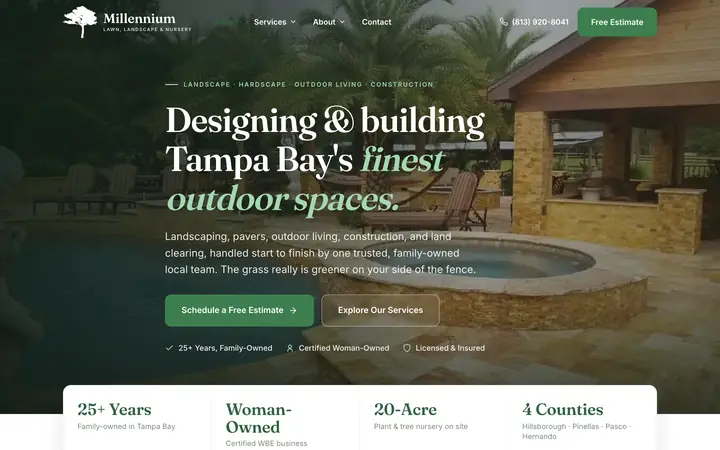
Millennium Lawn, Landscape & Nursery

A back office for a Tampa Bay design-build landscaper and nursery, from first inquiry to booked estimate.

  • Estimate calendar: booking an estimate emails the customer a written confirmation and sends the office a calendar invite it can accept into Outlook
  • Millie, an AI assistant that reads spreadsheets and PDFs, searches and updates leads, and books estimates after reading the details back for a yes
  • Single sign-on and two-way lead sync with ProjectScape, the AI field app we built for Millennium
  • Bounce alerts: if a customer's confirmation email bounces, the office is alerted and the lead is flagged
  • Paste an email or a note to log a phone lead and the details fill in, with the original email kept on the lead

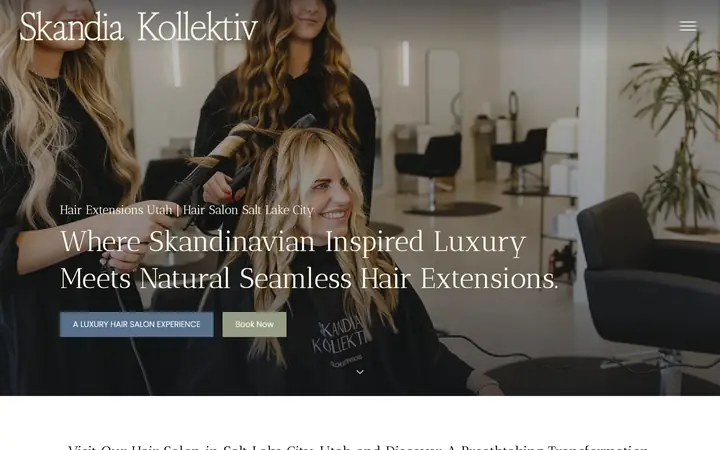
Skandia Kollektiv

A hair extension and color salon's back office for consultation follow-up, Google review asks and EOS planning.

  • Two 10-email consultation follow-up sequences moved out of a Google Apps Script and into the portal, sent from the salon's own domain
  • Each new consultation request is also logged in the salon's existing Google Sheet
  • Applications view for extension and color consultation requests, with goal, budget and timeline
  • Google review board fed by the salon's completed Boulevard appointments, with a check-in text before the review ask
  • An AI assistant for lead analysis and the review board, plus EOS planning pages for the V/TO and a bi-weekly Scorecard

Studio One Hair Design

A wholesale back office for a Fresno salon that sells hair extensions to other stylists.

  • Stylist applications with license upload, and one-click approval that creates the stylist's wholesale shop login
  • Inventory editor for the wholesale catalog: stock and price by length, a photo for each color, and plus and minus stock buttons that save on their own
  • Orders with PayPal payment links that mark an order paid only after the server confirms the payment
  • Five follow-up email sequences, live since July 2026

Glam.Is.On

A salon portal built around the tools the salon already used, while its website was still on Duda.

  • Pulls in leads from three Google Sheets and appointments from Square every two hours
  • Matches each booking back to the lead that produced it by email or phone; 660 bookings and 103 leads synced on launch day, July 20, 2026
  • Four pipelines, for Color, Extensions, Employment and Other, each exportable to PDF
  • A two-step text-for-review workflow, and five-email follow-up sequences for extension, color and general leads, live since September 2026

National Hair Centers

A hair restoration portal with automated follow-up from first inquiry to booked consultation.

  • Men's and women's follow-up sequences, then a warm-to-book sequence that invites interested leads to book a consultation on Calendly
  • Consultation prep emails after a Calendly booking, and a daily follow-up digest
  • Transplant referral follow-ups emailed to the affiliated physician and the owner on a schedule
  • An AI Previews view of requests from the website's AI hair-system preview tool
  • A Google review ask board, plus owner replies to reviews posted from the portal
Problem solving

How We Solved the Hard Parts

  1. Real customers caught by spam filters

    Every portal has a Spam & Blocked tab that lists what the filters stopped, with the reason, and flags reCAPTCHA blocks as possibly real. Anything marked as spam is hidden, not deleted, and comes back with one click.

  2. One platform, 27 different businesses

    Each portal starts as a copy of a proven one, then gets the client's brand, its own views and its own stage names. Every portal reads the same shared lead database, with each client's records walled off in the database itself. Because they are all built the same way, an improvement made once can go out to every portal: on July 31, 2026, the unread inbox and spam detail view reached all 16 portals then live on the same day.

  3. Bookings with no link to the lead

    Glam.Is.On's portal pulls in Square appointments and matches each one to the lead that produced it by email or phone, so the salon can see which inquiries turned into appointments. It synced 660 bookings on launch day.

  4. Estimates booked outside any system

    At Millennium, estimates were booked in Outlook and never reached the lead records, and the customer got nothing in writing. The portal's estimate calendar now emails the customer a confirmation and sends the office a calendar invite to accept into Outlook.

  5. Follow-up email stuck in a script

    Skandia Kollektiv's 20 consultation follow-up emails ran from a Google Apps Script. We moved them into the portal: dropping a lead into the Cold stage starts its sequence, moving it out stops it, and every email sends from the salon's own domain.

Results

What It Changed

Between May and October 2026 we built 27 admin portals. Fifteen run on the client's own admin web address, 21 have views built for that business, and every one has the Spam & Blocked tab. Where a business had a real bottleneck, the portal grew to fit it: booked estimates at Millennium, wholesale orders at Studio One, follow-up email at Skandia Kollektiv and bookings at Glam.Is.On.

We don't credit a portal with sales on its own. What it changes is that every lead, blocked submission and status change is recorded in one place, so questions like how fast new leads get a reply and how many turn into booked work can be answered from real records instead of memory. It is also where results get counted: Mattra Inc.'s monthly lead numbers come from the same lead records its portal shows.

Counts come from the 27 portal code repositories and our launch records as of October 20, 2026, and each of the 15 custom admin domains was loaded that day to confirm it is live.

Timeline

Project Timeline

  1. First portal started for Debbie Cooley Mortgage, the reference build
  2. First portal live in production, for Mattra Inc.
  3. Glam.Is.On portal launches with Square and Google Sheets sync
  4. Unread inbox and spam detail view reach all 16 portals then live
  5. Staff invites and user management roll out fleet-wide
  6. Portals 26 and 27 started
  7. Millennium estimate calendar ships with customer confirmations
Questions

Questions About This Project

Do I need a website built by WES to get an admin portal?

Every form on a WES-built website already feeds the portal, so leads show up from day one. If your site lives somewhere else, we can start from what you already use: Glam.Is.On's portal was built while its website was still on Duda, pulling leads from Google Sheets and appointments from Square.

Can my staff use it without seeing everything?

Yes. You invite staff from the portal and can limit a person to one area, such as careers only. You can see when each person last signed in and resend an invite, and everyone signs in with a password or with Google.

Will it work with the booking system and tools we already use?

Our portals already work with Square, Calendly, Vagaro, Boulevard and Google Sheets. Glam.Is.On's portal, for example, matches each Square appointment to the lead that produced it, and National Hair Centers' portal sends consultation prep emails timed to each Calendly booking.

More work

Related Projects

Millennium Lawn, Landscape & Nursery website
Home & Field ServicesFeatured

Millennium Lawn, Landscape & Nursery

Landscape design-build, tree service and plant nursery, Odessa, FL

A small, dated WordPress site rebuilt in 16 days, then full SEO with posts 4 days a week. Organic search sessions up 184%.

+184%organic search sessions
Website DesignWebsite MigrationAdmin PortalContent StudioCustom Web AppGoogle AdsSEO
Skandia Kollektiv website
Beauty, Hair & Med SpaFeatured

Skandia Kollektiv

Luxury hair extension and color salon, Salt Lake City, UT

A Salt Lake City extension salon rebuilt off Duda, with Boulevard bookings sent to Google Ads, an admin portal and a weekly AI newsletter.

$254 to $218Google Ads cost per conversion

Website MigrationAdmin PortalContent StudioCustom Web AppGoogle Ads
Studio One Hair Design website
Beauty, Hair & Med SpaFeatured

Studio One Hair Design

Hair extension, color and wig salon with retail and wholesale sales, Fresno, CA

Site and shop moved off Webflow, plus a stylist-only wholesale store and email follow-up. Monthly leads up 75%; real ad leads cost $31 each.

+75%monthly website leads

Website MigrationCustom Web AppAdmin PortalGoogle AdsContent Studio

See the Full Portfolio

Want a Website That Works This Hard?

Tell us about your business and where your leads come from today. We will show you what we would build, and what we would keep.