Designing with AI
AI can make a flyer in about ten seconds. Whether anyone reads it comes down to a question most people skip.
When someone shows me something they designed, the question I usually get is whether it looks good. On their screen it usually does. The colors work, the photo's nice, the headline is clever.
Then it goes out into the world. It gets shrunk to the width of a phone, taped to a wall, folded into thirds, or forwarded to someone who's never heard of the business. That's where looking good stops being enough.
Is it pretty? Ask that second.
Ask first what the person looking at it is going through, what they need, what information helps them, and what their next step is. Once you know that, the design gets easier, because you know what has to fit and what can go.
When pretty comes first
- Great copy with no call to action
- Text that's too small to read once the image is on a phone
- A brochure so full nobody starts reading it
- A new font and a new color scheme every time
When the reader comes first
- One message they can take in at a glance
- Text sized for where they'll see it
- Only what they need at this stage
- One next step, easy to find
Every exercise on this page shares one set of answers, so what you type in step one carries into the prompts after it. It's saved in your browser and nowhere else.
Jump to a section
Five formats, five different readers
A banner, a flyer, a trifold, a social post and a report each get read in a different place, at a different speed. Before you design one, picture where it's going to be when someone looks at it.
| Format | Where it's seen | What matters most | The common miss |
|---|---|---|---|
| Banner | From across a room or a parking lot, for a few seconds | A handful of words, huge type, one action | Too many words to read while walking past |
| Flyer or PDF | In a hand, on a counter, in an inbox | One headline, up to three points, one next step | Beautiful copy that ends with a logo and no call to action |
| Trifold brochure | Picked up, then opened panel by panel | Each panel does one job, in the order it unfolds | Everything on every panel, so it overwhelms |
| Social post | On a phone, for half a second while scrolling | One idea, text readable at phone width | Text that disappears once the image shrinks |
| Report | At a desk, often forwarded to someone else | The answer first, then the detail | The conclusion buried on page six |
1. Know your audience
Before you open any design tool, answer five things about the person you're making this for.
- Where they are in the buying process. Just noticing a problem, comparing options, ready to pick someone, or already a customer. Each one needs a different piece.
- What they already know. Leave it out. Repeating it uses up attention you need for the new part.
- What they don't know yet. This is usually the gap your piece is there to fill.
- What they need to understand first. If your offer only makes sense once they know one thing, that one thing goes on the page.
- The next step. One action. Call, book, scan, reply, visit. Pick one.
Most flyers I see fall down on number five. They're well written, they look great, and they end with a logo and nothing to do.
Exercise: an audience-first flyer
Answer these and the prompt below writes itself.
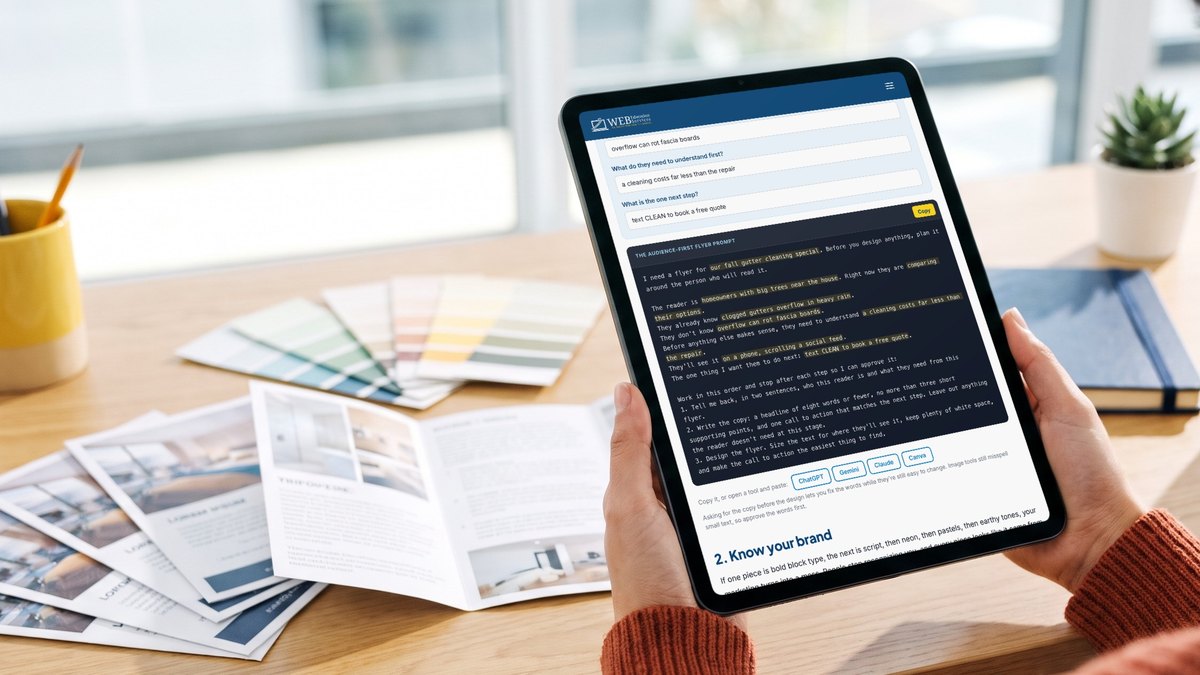
I need a flyer for [WHAT YOU ARE PROMOTING]. Before you design anything, plan it around the person who will read it.

The reader is [WHO IT IS FOR]. Right now they are [WHERE THEY ARE IN THE BUYING PROCESS].
They already know [WHAT THEY ALREADY KNOW].
They don't know [WHAT THEY DO NOT KNOW YET].
Before anything else makes sense, they need to understand [WHAT THEY NEED TO UNDERSTAND FIRST].
They'll see it [WHERE THEY WILL SEE IT].
The one thing I want them to do next: [THE ONE NEXT STEP].

Work in this order and stop after each step so I can approve it:
1. Tell me back, in two sentences, who this reader is and what they need from this flyer.
2. Write the copy: a headline of eight words or fewer, no more than three short supporting points, and one call to action that matches the next step. Leave out anything the reader doesn't need at this stage.
3. Design the flyer. Size the text for where they'll see it, keep plenty of white space, and make the call to action the easiest thing to find.
Asking for the copy before the design lets you fix the words while they're still easy to change. Image tools still misspell small text, so approve the words first.
2. Know your brand
If one piece is bold block type, the next is script, then neon, then pastels, then earthy tones, your marketing turns into a mess. People stop recognizing you, and every piece looks like it came from a different business.
Write down three things and keep them where you'll paste them every time you design something.
- Your colors as hex codes: a main color, an accent and a background
- Your fonts: one for headlines and one for body text
- Three words that describe how your brand should feel
Not sure what yours are? Check your logo file or your website, or ask whoever designed them.
Exercise: the same flyer, in your brand
Add your brand. Your answers from step one are already in this prompt.
Change any step one answer above and it updates here too.
I need a flyer for [WHAT YOU ARE PROMOTING]. Before you design anything, plan it around the person who will read it.

The reader is [WHO IT IS FOR]. Right now they are [WHERE THEY ARE IN THE BUYING PROCESS].
They already know [WHAT THEY ALREADY KNOW].
They don't know [WHAT THEY DO NOT KNOW YET].
Before anything else makes sense, they need to understand [WHAT THEY NEED TO UNDERSTAND FIRST].
They'll see it [WHERE THEY WILL SEE IT].
The one thing I want them to do next: [THE ONE NEXT STEP].

Use my brand. Main color [MAIN COLOR], accent [ACCENT], background [BACKGROUND]. Headlines in [HEADLINE FONT], body text in [BODY FONT]. The style should feel [YOUR STYLE]. I've attached my logo. Put it where it's visible without competing with the headline. Use only these colors and fonts. If you can't use one of my fonts, pick the closest match and tell me which one you used.

Work in this order and stop after each step so I can approve it:
1. Tell me back, in two sentences, who this reader is and what they need from this flyer.
2. Write the copy: a headline of eight words or fewer, no more than three short supporting points, and one call to action that matches the next step. Leave out anything the reader doesn't need at this stage.
3. Design the flyer in my colors and fonts. Size the text for where they'll see it, keep plenty of white space, and make the call to action the easiest thing to find.
"Use only these colors and fonts" is the line that keeps AI from adding a sixth color because it looked nice.
3. It's about them
Your flyer is one moment in a longer process your customer goes through. They notice a problem, look around, compare, decide, buy, and if it goes well, come back and send friends. That process is the buyer's journey, and each stage of it needs different information.
A banner at a home show talks to people who've never heard of you. A trifold you hand over after a free estimate talks to someone who's close to saying yes. Same business, different reader, different piece.
Exercise: map your buyer's journey in seven questions
Answer the seven questions. Short answers are fine.
Help me map my buyer's journey as a flow chart. My business: [WHAT YOUR BUSINESS DOES].

Here's what I know about my customers:
1. What makes them start looking: [ANSWER 1]
2. What they search for or ask first: [ANSWER 2]
3. What they compare me to, including doing nothing: [ANSWER 3]
4. What worries or questions slow them down: [ANSWER 4]
5. What makes them choose me: [ANSWER 5]
6. What happens right after they buy: [ANSWER 6]
7. What gets them to come back or send a friend: [ANSWER 7]

Turn this into a flow chart with five stages: aware of the problem, looking at options, deciding, buying and getting started, coming back and referring.
Under each stage, list what the customer is thinking, what they need to know, and the kind of content that helps them (flyer, banner, trifold, social post, report, email).
Draw it as a diagram, and also give me Mermaid code so I can edit it later.
Then tell me which stage I'm weakest at, based on what I described.
ChatGPT and Claude can usually draw the chart right in the chat. If you get Mermaid code instead, paste it into mermaid.live to see it. Save the result. You'll use it in the next two steps and on every piece after this one.
4. Find where this piece fits
Now take the piece you're working on and place it on that map. A trifold that tries to serve every stage at once ends up crowded, and nobody finds the part meant for them.
Tell it what you made.
Here's a piece of content I made: a [KIND OF PIECE] about [WHAT IT IS ABOUT]. I've attached it or pasted it below.

Here's my buyer's journey:
[YOUR JOURNEY]

Use the buyer's journey we mapped earlier in this chat.

Tell me:
1. Which stage of the journey this piece belongs in, and why.
2. What the reader already knows at that stage, and what this piece assumes they know.
3. What it's missing for that stage.
4. What it includes that belongs in a different stage.
5. The one next step it should point to.
If the answer is "this belongs in two stages," you probably have two pieces. Split it.
5. Review your work
Last, hold your draft up against the buyer's journey and get a straight review of what's working and what isn't.
First, the phone test
Can you read every word without zooming? Can you find the next step in two seconds? If not, that's the first fix. Your image stays on your device.
Then, the review prompt
Your answers from step one carry over. Pick the format and adjust anything that changed.
I've attached my [KIND OF PIECE]. It's for [WHO IT IS FOR], who are [WHERE THEY ARE]. They'll see it [WHERE THEY WILL SEE IT]. The next step I want them to take: [THE NEXT STEP].

Review it against that stage of the buyer's journey and give me four lists:
The good: what works for this reader and should stay.
The bad: what gets in the way, like too much text, a missing or buried call to action, or information that belongs at a different stage.
The ugly: design problems, like text too small to read where they'll see it, low contrast, too many fonts or colors, or a crowded layout.
The fix list: every change in priority order, most important first, specific enough that I can do it in ten minutes.

Then rewrite the headline and the call to action if they need it.
Attach the image or PDF in the same message as the prompt. Ask for the fix list in priority order so you know which ten minutes matter most.
Now you have a great piece of content
You know who it's for and where they are. It looks like you. It sits in the right spot on their buyer's journey, and it's been checked against it. Run through this before it goes out.
- I can name who it's for and where they are in the buying process
- It says only what they need at this stage
- There's one next step, and it's easy to find
- Every word is readable where they'll see it, including on a phone
- It uses my colors and my fonts, and nothing else
- It looks good. (That one's allowed now.)
Questions people ask
Which AI tool should I use to design?
Any of the big ones can follow these prompts. ChatGPT, Gemini and Claude are good at planning the piece and writing the copy, and the image tools in ChatGPT and Gemini can draw a draft. Canva's AI tools are handy when you want to finish the design by hand.
Why does AI get the words on my flyer wrong?
Image models still misspell small text. That's why every prompt here asks for the copy first. Approve the words, then set them yourself in Canva or your design tool if the image comes back with mistakes.
How big should the text be on a social post?
Big enough to read when the image is the width of a phone, because that's how almost everyone will see it. Use the phone test on this page before you post anything.
What if I don't know my brand colors and fonts?
Check your logo file or your website, or ask whoever designed them. If you never picked any, choose one headline font, one body font and two or three colors, and use them on everything from now on.
What is a buyer's journey?
It's the path a customer takes from noticing a problem to buying and, if it goes well, coming back and referring friends. Each stage needs different information, so each piece of content should be made for one stage.
Do I have to do all five steps every time?
Steps one and two, yes, every time. Map your buyer's journey once and reuse it. Steps four and five take a couple of minutes and catch most of the problems before anyone else sees them.
Design one with us on Friday
We're running a flyer and a social post through all five steps in this Friday's free workshop at 2 PM Eastern. Bring something you've already made and we'll review it together.
Follow for more.