
Process Overview | Facebook Ads
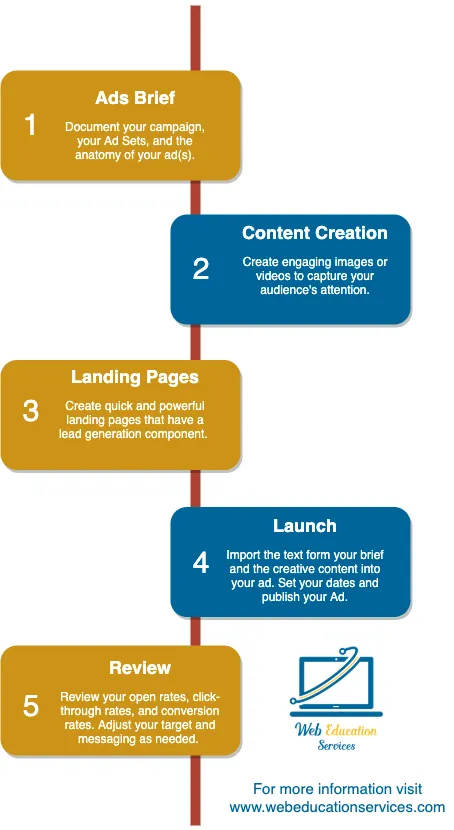
Step 1: Outline Your Digital Ad
List of Services
-
1. Open your ad brief template
If you don't have an ads brief template for your company, open ours.
Open WES ad brief template List Item 1 -
2. Create a strategy
In general, you want your ad campaign to have a general strategy.
This includes a Campaign name that is used for quick reference, a campaign objective, a target audience, a theme, and a call to action.
For more details, open our ad brief template.
Open WES ad brief template List Item 2 -
3. Ad set configuration
Defining your ad set is about determining your delivery method, your bidding strategy, your target demographics, target geographics, and target psychographics.
For more details, open our ad brief template.
Open ad brief -
4. The anatomy of the ad
The anatomy of the ad is what people see in their feed.
Here you write your post text, identify your post creative, write your headline, identify your URL, identify your CTA, identify your landing page, and thank you page.
For more details, open our ad brief template.
Open ad brief
Step 2: Content Creation
Videos or images can quickly communicate your marketing message to your target audience. Below are some of our favorite FREE resources for creating content.List of Services
-
1. Free stock images
Our favorite go-to for free stock images is unsplash.com. The images are royalty-free, and you are not required to credit the photographer. However, it is recommended.
https://unsplash.com/ List Item 1 -
2. Free photo editor
Now that you've downloaded your photo, you can make it your own by adding filters, blurring backgrounds, adding text, and making other simple changes.
We recommend pixlr.com for simple photo editing.
https://pixlr.com/x/ List Item 2 -
3. Stock video
Our favorite go-to for stock video is https://pixabay.com/. The video is free, and you are not required to credit the videographer. However, it is recommended.
https://pixabay.com/ -
4. Video editor
Now that you have a video or even a few images that you want to turn into a slide show, you need a video editor.
We recommend iMovie. It is an intuitive video editor that is great for individuals that are just getting started.
https://www.apple.com/imovie/
Step 3: Landing Pages
Your ad needs to take people to a specific page that is designed to convert visitors into leads.List of Services
-
1. Design Your Form
The form collects the information needed to convert a visitor into a lead.
Remember, the less you ask, the more likely a person completes the form. If you are only asking for them to subscribe to your blog, ask for their email.
If they are looking for a demo, have fields for name, email, and phone number. Depending on the ad and the giveaway, you can ask for more or less information.
Hubspot Tips List Item 1 -
2. Layout your page
You should have a content management system that allows you to create landing pages easily. See your CMS help center for specifics.
If you can't create a landing page, check out our video below.
Segmentation tips
Step 4: Launch
Facebook Ads Launch
-
1. Go to Facebook Business Manager
You want to open your Facebook Business Manager. If you haven't setup business manager, go to our how to guide to get started.
Setup Facebook Business Manager List Item 1 -
2. Navigate to Ads Manager
Go to the ads manager in your Facebook Business Manager. Or click on our quick link below.
Link to Ads Manager -
3. Input your ad and creative
- Click on the green plus icon to create a new campaign.
- Complete all the fields in the campaign editor. Use your creative brief as needed.
- Complete all the fields in the ad set. Use your creative brief as needed.
- Complete all the fields in the ad. Use your creative brief as needed.
- Add additional ad sets and ads as needed. Use your creative brief as nedeed.
Step 5: Review
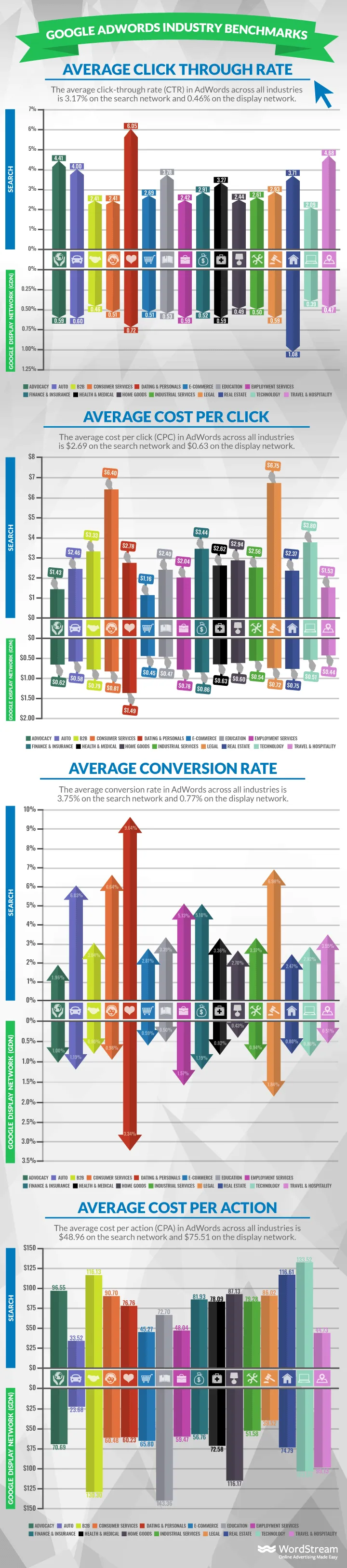
Make sure you are tracking your impressions, reach, click-throughs, cost per impression, and cost per click. To view your campaign data go to https://business.facebook.com/adsmanager/manage/all/summary.For industry benchmarks, check out the latest from our friends at WordStream.
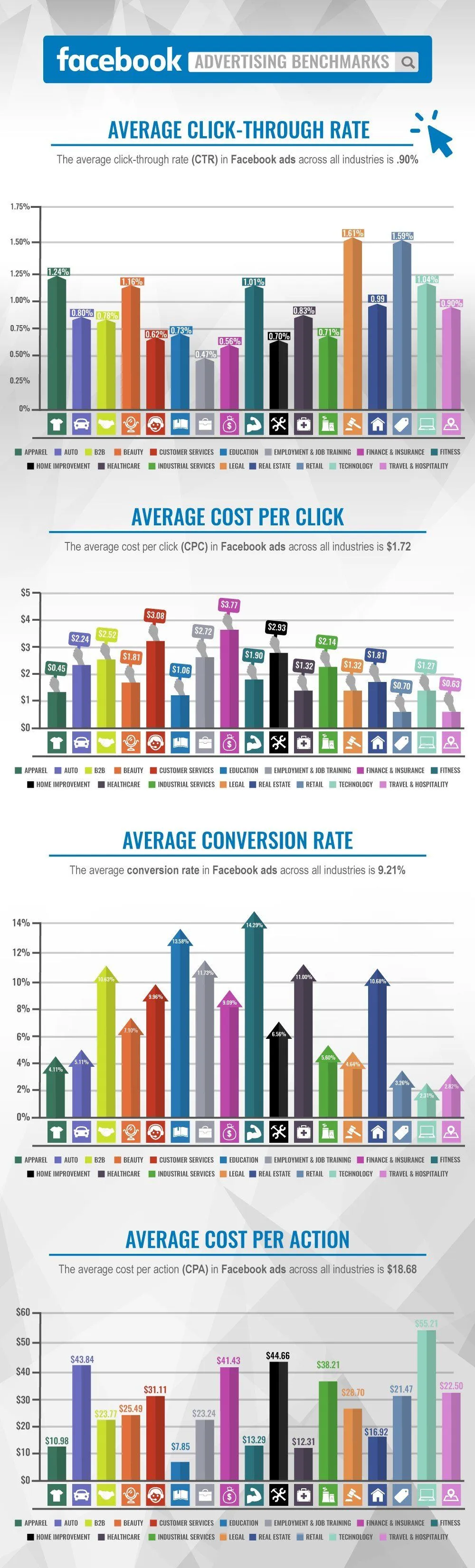
For industry benchmarks, check out the latest from our friends at WordStream.
Other Marketing How-To Guides:
📙Social Media Guide
📙Blogging Guide
📙Email Marketing Guide
📙Digital Advertising Guide
📙Local SEO Guide
📙Reputation Management Guide
📙On-page SEO Guide
📙Premium Content Guide