I named mine Bubba. That is the whole reason I ended up using it every day instead of twice and forgetting about it. Here is what a personal AI agent actually does for a business with one marketing person, which is to say for a business where the marketing person is also the owner, the salesperson and the one on the truck.
Meta's help center says you can customize your agent's name, personality and preferences just by telling it. It reads like a gimmick. It behaves like onboarding. A tool you talk to by name gets opened daily. A tool called "the AI" gets opened when you remember it exists.
What this covers
What Muse actually is
Meta launched Muse on September 8, 2026 and called it "a secure, private personal AI agent that proactively helps with people's goals and suggests ideas." It runs on a dedicated virtual machine with its own browser, so it can open pages, fill out forms and work through things step by step. (Meta Newsroom, September 8, 2026)
The part that matters for a business is this line from Meta's own FAQ: "When you ask Muse to do something, it keeps working in the background whether you're actively using the app or not." It comes back to you when something changes or when it needs approval. (Meta, Muse product FAQ)
Facebook, Instagram and Threads connect automatically if your accounts are in the same Accounts Center. Meta's words: "You don't need to do anything to set these up." Email, calendar and other services connect through Connectors, and you can build a custom one for anything not on the list. (Meta Help Center, How Muse works with Connectors)
The boundary nobody mentions
Before the useful part, the thing that will save you an afternoon.
Muse is a personal agent. It connects to your own accounts. There is nothing in Meta's documentation about managing a Facebook Page inbox with a team, and nothing at all about Ads Manager. If you went looking for an AI that logs into Business Suite and runs your campaigns, that is not what shipped.
Why this matters before you start
A lot of what is being written about Muse right now comes from companies that sell scheduling and social tools. Some of it is accurate. All of it has a reason to describe the gap in a particular way. Meta's own help center settled every question I had faster than the commentary did.
Here is the honest shape of it. For a business with a marketing department, Muse is a personal assistant that happens to know your social accounts. For a solopreneur, where your account effectively is the business, that distinction mostly disappears, and the agent becomes genuinely useful.
Where the time actually comes back
Not from generating posts. Everyone leads with that and it is the smallest win. The time comes back in three unglamorous places.
One: the inbox stops being a chore
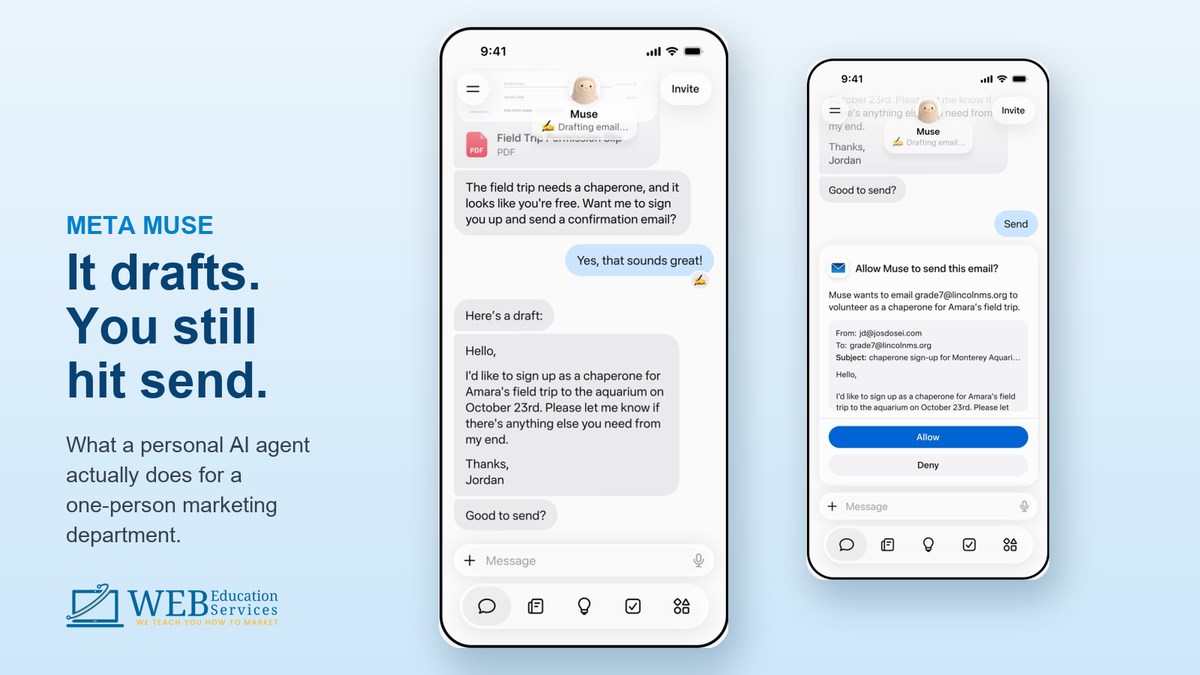
Meta documents that Muse asks permission before actions like sending messages. That constraint is the feature. It can read and draft; you decide what leaves.
Ask it to go through unread messages, group them by what people are actually asking, and draft a reply to each one in your voice, sending nothing. What comes back is a sorted stack: four people asking whether you cover their area, three asking price, two real leads, one spam. You read down it, fix two, send. Twenty minutes becomes four.
Two: standing jobs instead of questions
Most people use AI like a vending machine. Ask, get, leave. That throws away the part that matters, which is that it keeps working while you are on a roof.
Give it a job that repeats instead. Check messages and comments every morning at seven; if anyone asks about a quote or a price, message me right away with their name and what they asked; everything else waits for the summary. Now the lead finds you instead of sitting in an app until eleven the next morning.
Three: a Monday that is already written
Muse can create real files, not just chat replies. Meta lists spreadsheets, documents, PDFs and images among the artifacts it generates, and recurring tasks show up in an Upcoming tab. So build yourself a Monday briefing and ask for a recommendation with a reason attached, not a wall of numbers. The instruction that makes it work is "keep it under a page."
Where the leads and the sales come from
Two mechanisms, and neither one is posting more often.
Speed
Being first to reply is most of the game in local service work, and you cannot win it by checking an app more frequently. An agent that watches the inbox while you are under a sink and pings you the moment someone asks about price is worth more than another week of content.
Language
Nobody searches for "comprehensive lawn care solutions." They message you saying "my yard is embarrassing and my HOA sent a letter." One of those is ad copy and it is not the one you wrote.
Your customers have been handing you the exact words for years, in your DMs and your comments, just never in one place where the pattern was visible. Ask the agent to read the last ninety days and pull the exact phrases people use to describe their problem, in their words, not summarized. Then stop writing marketing copy and start using theirs.
To be straight about this one
This is not an ads integration. Muse is not plugged into Ads Manager and will not build a campaign. This is you, using an agent to read what you already own, and writing better than you were writing before. The lift is real and the mechanism is ordinary.
The prompts
These are the seven from the daily series, in one place. Fill in the brackets.
Teach it your business, once
You are helping me run marketing for my business. Here is what you need to know and remember from now on.

What I sell: [SERVICES]
What I do not do: [THE JOBS YOU TURN DOWN]
Where I work: [SERVICE AREA]
The job I want more of: [THE PROFITABLE ONE]
The job I am tired of: [THE ONE THAT IS NOT WORTH IT]
How I talk to customers: [PLAIN, FORMAL, FUNNY, BLUNT]
The three questions I answer every single week: [LIST THEM]

Confirm you have this, then wait. I will give you work from here.
These work in Muse and in any other assistant. The buttons copy the prompt as they open the tool.
Clear the inbox without sending anything
Go through my unread messages and comments.

Group them by what they are actually asking, not by who sent them.

For each one, draft a reply in my voice. Keep it short. If a message needs information only I have, write the draft with a clear [BLANK] where that information goes.

Flag anything that reads like a real buying question separately at the top.

Do not send anything.
The last line is the one that matters. Drafting is safe. Sending is not, until you have read a few weeks of its work.
The standing job that catches leads
Set this up as a recurring task, every day at 7am.

Check my messages and comments since the last check.

If anyone asks about a quote, a price, availability, or how soon I can come out, message me immediately with their name, what they asked, and where they asked it.

Everything else, hold for a single summary at 5pm.

If nothing came in, say nothing. Do not send me an empty report.
"Do not send me an empty report" is why you will still have this running in a month.
Mine your own DMs for ad copy
Read my Facebook and Instagram messages and comments from the last 90 days.

Pull out the exact phrases customers use to describe their problem. Their words, verbatim, not summarized and not cleaned up.

Group them by what the person was actually worried about: money, time, mess, embarrassment, safety, or something else you notice.

Show me the ten phrases that come up most, with how many times each appeared.

Then tell me which three would work as the first line of an ad, and why.
"Verbatim, not cleaned up" is doing the work. Summarized customer language is just your language again.
The Monday report
Every Monday at 8am, give me a short report on last week.

1. Which of my posts got the most comments, shares and saves, and what did they have in common.
2. Every question that came in more than once.
3. Anyone who asked about pricing and never got a reply from me.
4. Anything a competitor in my area posted that got unusual engagement, if you can see it.

Then tell me the single thing I should post this week and why, based on what you just found.

Keep the whole thing under one page. I would rather have one recommendation I act on than ten numbers I ignore.
Item three finds money. It is the one people are most surprised by.
Set the permissions before you set anything else
An agent that can message your customers is a different animal from a tool that writes captions, and Meta's permission controls are correspondingly detailed. When it wants to act you get five choices: allow once, allow for this task, allow for this site, always allow for this connector, or deny. Many connectors can also be set so it can retrieve information but never take action. (Meta Help Center, How Muse works with your guidance and approval)
How I have Bubba set, and why:
- Reading anything of mine: always allow. There is no risk in it reading my own messages, and asking every time makes it useless.
- Sending a message to a customer: ask every time, permanently. I am not automating my voice to the people who pay me.
- Anything involving money: ask every time. It can check out with a card. That is a real capability and it deserves a real gate.
- Posting publicly: ask every time. A wrong draft is a deleted file. A wrong post is a screenshot.
- Open the Activity log once a week. Meta describes it as a chronological record of what your agent has done and the permissions you granted. It is the only honest way to know what is happening on your behalf.
Meta's own warning, in their words: your Muse "may be inaccurate or take unexpected actions. Monitor its actions carefully and intervene as needed." Set it up so the worst case is a bad draft you delete, not a bad message a customer already read.
What it does and does not do
Documented today
- Connects to your Facebook, Instagram and Threads automatically
- Reads, drafts and asks before sending
- Keeps working after you close the app
- Recurring tasks and reminders, delivered in chat
- Creates spreadsheets, documents and PDFs
- Browses, fills forms, and can check out with a card
- Custom connectors for tools it does not know
Not there
- Page inbox management for a team
- Any documented Ads Manager control
- Native post scheduling to Facebook or Instagram
- Availability outside the US and Canada
- Any guarantee it is right; Meta says so plainly
Muse launched in the US on September 8, 2026 and reached Canada ten days later. It is free up to a usage limit with paid plans above that. If you are reading this from anywhere else, this is a "soon" rather than a "today."
Questions owners ask
Do I need to pay for it?
Not to start. Meta's answer is that Muse is free with a usage limit, and if you hit the limit you can upgrade or wait for it to refresh. For an inbox and a weekly report, the free tier goes a long way. You will know when you have outgrown it.
Is it safe to connect my business accounts?
Meta keeps logins in a credential store the agent cannot read, generates a one-time card number at checkout so the merchant never sees your real card, and says conversations are not shared with its ad systems. Separately, a Sentinel component sits between the agent and the internet. None of that removes your job, which is to set the permissions and read the Activity log.
Will it replace my social media manager?
No, and not for the reason people expect. It has no documented ability to publish or schedule to Facebook and Instagram. What it replaces is the hour a week you spend on inbox triage and the report nobody was writing.
Can it work with my CRM or booking system?
Through a custom connector, yes, if the service has an API. Meta's own caution is worth repeating: they do not review custom connectors, so only point it at tools you actually trust.
What is the single first thing to do?
Teach it your business, using the first prompt above. Everything else is worse until it knows what you sell and who you sell it to.
Sources
- Meta Newsroom, "Introducing Muse: The World's First Personal AI Agent Built for Everyone," September 8, 2026
about.fb.com/news/2026/09/introducing-muse-personal-ai-agent - Meta, Muse product page and FAQ
ai.meta.com/muse - Meta Help Center, "How Muse works with Connectors"
meta.com/help/artificial-intelligence/1687253048996149 - Meta Help Center, "How Muse works with your guidance and approval"
meta.com/help/artificial-intelligence/1385290430137537 - Meta Help Center, "How to get started with Muse" and "How to manage reminders and scheduled tasks with Muse"
meta.com/help/artificial-intelligence/1303670544995562
Interface images in this article are frames from Meta's own publicly published Muse demo videos.
Want help setting yours up?
We walk small business owners through connecting an agent, setting the permissions properly, and building the two or three standing jobs that actually save time. Bring your inbox.